Catalog & Products
The CRM (Customer Relationship Management) is where you manage your products, categories, and inventory. It’s organized as a simple table-based system on the NocoDB platform.
What is the CRM?
The CRM is your shop’s control panel — a table with columns and rows where you enter products and their parameters.
Why use a computer? We recommend working with the CRM on a laptop or tablet — it’s much more convenient than on mobile.
Accessing the CRM
Direct Link: crm.shopsbuilder.app
How to Access
Option 1: Email Link
- After creating your store in @ShopsBuilderBot, you’ll receive an email invitation with a link to register on NocoDB
- Click the registration link in the email
- Create your account (if you have trouble, try “Forgot Password”)
- Start adding products
Option 2: In Bot
- Open @ShopsBuilderBot
- Go to the Store section
- Click on the CRM link
- Access your product management panel
Didn’t Receive Registration Link?
First shop? Check your “Spam” folder in your email
Already have a shop? The invitation is sent only when creating the first shop. If you have already created a shop with this email, the invitation won’t be sent again — your new shop will appear in your current account automatically after deployment
Still no access? Contact our support @ShopDevTeam
CRM Tabs
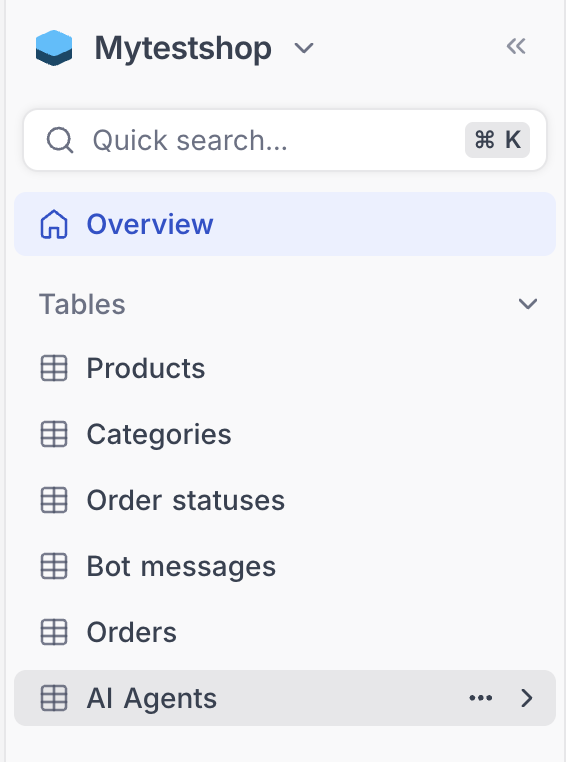
On the left side of the control panel, you’ll see tabs for:
- Categories — Organize your products
- Products — Add and manage your inventory
- Order Statuses — Track and update order progress
- Bot Messages — Configure bot responses
The CRM comes pre-filled with example products — you can delete or edit these as needed.